Most of what your company knows is not written down anywhere. It sits in people’s heads: the support rep who knows the workaround, or the salesperson who has heard every objection. Peer learning platforms are software that helps those people share what they know with colleagues, in short pieces, while the work is happening.
This guide explains what these platforms do and how they differ from a classic learning management system (LMS, the software companies use to assign and track formal courses). It also covers which vendors are worth a look in 2026 and how to run a rollout people actually use.
Key Takeaways
- Peer learning platforms let employees create, answer and review content for each other, instead of waiting for a central training team.
- The features that matter most are simple authoring, Q&A, structured peer feedback, search and useful reporting.
- Corporate options include 360Learning, TalentLMS, Adobe Learning Manager, iSpring Learn, Absorb LMS, the Rockstar Learning Platform and Learning Pool.
- For classrooms, Blackboard, Peerceptiv, PeerStudio and EducateMe focus on group work and peer review.
- Start with one team, one clear problem and a short pilot, then measure ramp time and content use before you scale.
What peer learning platforms are and why they matter now
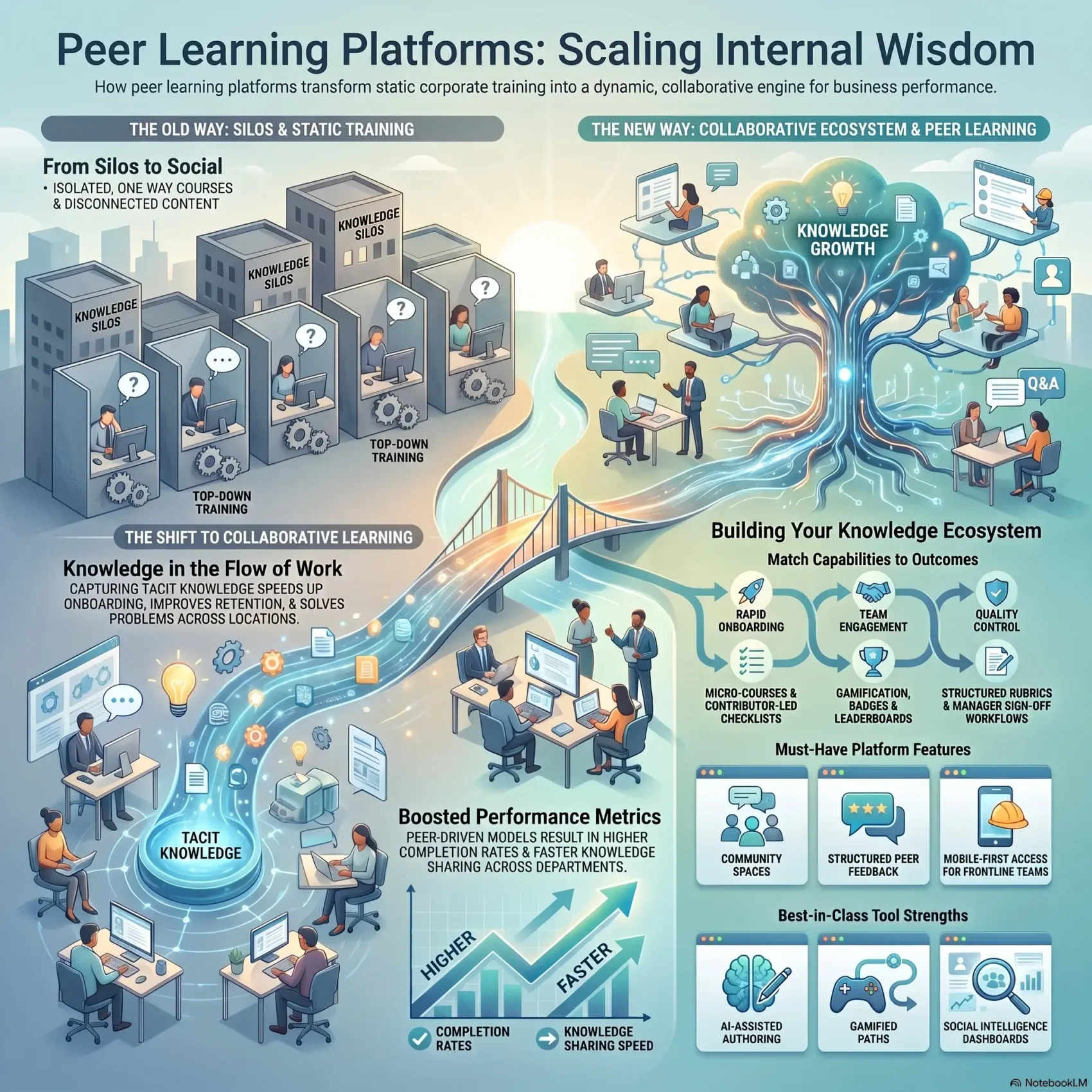
A peer learning platform is a training tool built around contributions from employees, not only from a training department. A colleague records a two-minute screen video, writes a short how-to or answers a question in a forum. Others comment, rate it and ask follow-up questions. The platform keeps all of it searchable.
The pressure to work this way has grown. Gallup’s State of the Global Workplace 2026 report found that global employee engagement fell to 20% in 2025, and engagement among managers dropped to 22%. When managers are stretched, new hires and career changers need other ways to get answers. Learning from peers is one of them, and it fits the wider employee engagement trends that push companies toward more social, less top-down development.
From top-down training to learning in the flow of work
Traditional courses are built centrally, published once and often go stale. A peer learning setup works more like an internal Q&A site combined with a course library. Content is created by the people closest to the problem, and it stays close to their daily tools.
Here is a simple example. A customer support team changes its refund process. Instead of waiting weeks for a new e-learning module, a team lead records a three-minute walkthrough the same day. Colleagues add questions below it, and the lead updates the video when a detail was unclear. That is the core idea behind modern knowledge management: capture know-how where it is used.
What it can and cannot do for team performance
Peer learning can help new hires find answers sooner and cut repeated questions to experts. Content also stays current, because more people maintain it. It is not a shortcut around quality control. Without moderation, you get duplicate, outdated or simply wrong material.
It also depends on culture. People share mistakes and half-finished knowledge only when that feels safe. If your teams are hesitant, work on psychological safety alongside the tool rollout.
How to choose a peer-to-peer learning platform
Name the exact problem before you compare vendors. “Improve learning” is too vague to guide a decision. “Cut the time a new support agent needs to handle tickets alone” is specific enough to test.
A digital skills gap analysis helps here. It shows which skills are missing and which teams feel the gap most, so you can judge whether a platform is built to close it.
Must-have capabilities to shortlist
- Easy authoring: employees should be able to create a short lesson, video or checklist in minutes, without an instructional designer.
- Q&A and discussion: threads, mentions and comments on content, so questions reach the right expert.
- Structured peer feedback: rubrics (scoring guides that define what “good” looks like), review cycles and, where needed, manager sign-off.
- Groups and communities: spaces by role, location or project, so people find colleagues facing the same problems.
Content compatibility and engagement
Check search, tagging and version control first. A library nobody can search is a dead end. If you already own courses, make sure the platform supports SCORM or xAPI. These are technical standards that let you import e-learning content from other tools without rebuilding it.
Engagement features such as points, badges and leaderboards can help early adoption. Use them carefully: rewards for volume can produce lots of low-value posts. Our guide to gamification in the workplace covers where game mechanics help and where they backfire.
Security, access and analytics
- Confirm single sign-on (SSO, one company login for all tools), role-based permissions and data retention rules with IT.
- Check mobile access, especially if frontline or deskless workers are part of the audience.
- Look for reports that show who contributes, which content gets used and where questions go unanswered, not only course completions.
Peer learning platforms for corporate training and employee development
The vendors below all support some form of employee-created content or social learning. Pricing is usually quote-based and depends on active users, so ask for a quote tied to your real headcount and run a demo with your own content.
360Learning
360Learning positions itself as an AI-powered platform for collaborative learning. Subject matter experts can author courses with AI assistance, and learners can comment on content, ask questions and flag what training they need next. It suits companies that want experts, not only the L&D team, to build most of the material.
TalentLMS
TalentLMS combines self-paced courses, live instructor-led sessions and webinars in one LMS. Discussion forums and gamification (points, badges, levels and leaderboards) add a social layer. It is often chosen by smaller and mid-sized companies that want a quick setup.
Adobe Learning Manager
Adobe Learning Manager offers social learning boards organized around skills, AI-based content recommendations, personalized learning paths and certifications. Adobe continues to ship regular releases in 2026. It fits organizations that already use Adobe tools or train customers and partners as well as staff.
iSpring Learn
iSpring Learn pairs an LMS with iSpring’s authoring tools, so teams can turn slides and documents into courses quickly. It adds portal-style features such as user profiles, a news feed and an org chart, which make it feel like an internal hub rather than a course catalog.
Absorb LMS
Absorb LMS is a corporate LMS with community and social features, automated reminders and detailed reporting. It suits companies that need formal compliance tracking and want some peer interaction on top.
Rockstar Learning Platform
The Rockstar Learning Platform comes from ELB Learning. It focuses on microlearning (short lessons built around one skill), user-generated content and publishing that works across devices. It is a fit when fast, on-demand content matters more than long courses.
Learning Pool
Learning Pool offers an LMS and a learning experience platform (LXP, a tool that recommends and curates content like a streaming service). Its social features include user-generated content, discussions and manager approvals, which help teams build communities of practice around a topic.
If AI recommendations and automated course building are high on your list, compare these options with our overview of AI learning platforms. For a broader view of the market, see our look at edtech for corporate training.
Peer learning tools for education and classroom collaboration
Schools and universities use peer learning mainly for group projects and peer review of assignments. Teachers get scalable feedback, and students learn to judge work against clear criteria.
Blackboard
Blackboard is one of the most widely used LMS products in higher education. It offers virtual classrooms, group work and AI tools that help instructors draft course structures and rubrics. Its parent company, Anthology, went through Chapter 11 restructuring and emerged in March 2026 under the Blackboard name, focused on its teaching and learning products. Institutions on long contracts should ask about the product roadmap.
Peerceptiv
Peerceptiv specializes in structured peer assessment. Students review each other’s submissions against rubrics, and team evaluations show how individuals contributed to group projects. It integrates with LMS platforms such as Canvas and D2L Brightspace. Peerceptiv now also markets a corporate version for onboarding, sales practice and code review.
PeerStudio
PeerStudio grew out of research at the UC San Diego Design Lab and Carnegie Mellon University. Learners review work through a comparison view, and an AI backend matches each submission with a useful example to compare against. It also flags low-effort reviews.
EducateMe
EducateMe is an LMS built for cohort-based programs, where a group moves through a course together. It supports peer review, group assignments, live sessions and built-in messaging, and it connects with tools such as Zoom and Miro.
Matching platforms to specific teams
The right choice depends less on the feature list and more on the job you need done. Two common scenarios show the difference.
New hire onboarding and role-based upskilling
New hires need fast answers and a clear path. Use short, expert-written lessons, a searchable Q&A hub and checklists for the first weeks. Our guide to remote onboarding and training shows how to structure that path for distributed teams. Add mentorship matching platforms when a new hire needs a named person rather than another module.
Customer-facing teams and compliance training
Sales and support teams benefit from scenario practice. For example, reps record a pitch and peers score it against a rubric before it goes in front of a customer. For regulated tasks, manager sign-off confirms that someone has actually shown the skill. Absorb LMS and Learning Pool both support approval workflows of this kind.
Feature-by-feature comparison
Line up features against your use cases and ignore the rest.
Collaboration and communication
Look for discussion boards, mentions and live sessions that connect to Slack, Microsoft Teams or Zoom. 360Learning centers on comments and Q&A around content. TalentLMS adds live sessions. Blackboard offers virtual classrooms and group spaces. If your team already works mostly in writing, see how asynchronous communication tools can carry part of the knowledge sharing.
Content creation and authoring
Test how long it takes a non-specialist to publish a lesson. iSpring Learn is strong at converting existing slides. Rockstar focuses on microlearning. Absorb and Learning Pool support user-generated content. If short content will be your main format, pair the tool with a deliberate microlearning strategy so every module targets one outcome.
Assessment and feedback
Check peer review workflows, rubrics and approvals. Peerceptiv and PeerStudio are built for structured review. Learning Pool and Absorb add manager approvals. Written standard operating procedures make a good base for rubrics, because they already describe what correct work looks like.
Analytics and reporting
Completion rates alone say little. Prioritize reports that show contribution rates, content use, unanswered questions and progress by team. Tie them to business measures such as time to productivity. Our guide to measuring upskilling ROI explains how to connect learning data to results finance will accept.
If a platform uses AI to grade learners or decide who gets access to training, check the EU AI Act. It lists AI systems that evaluate learning outcomes in education and vocational training as high-risk. EU lawmakers agreed in 2026 to delay most of those high-risk duties to December 2027, so there is time to prepare. Our EU AI Act compliance guide covers the details.
Implementation: integrations, adoption and rollout
Start by mapping where your teams already spend their day: chat, calendar, ticketing system or CRM. The platform should plug into that flow, not ask people to visit yet another tab.
Stack or single tool?
You can combine separate tools, such as Slack or Teams for questions, Zoom for live sessions and Notion for documentation. Or you can use one learning platform that covers authoring, Q&A and reporting while integrating with your chat tools.
- A stack lets you pick the best tool for each job, but knowledge ends up spread across several places.
- A single platform means simpler administration, one login and one set of reports, with less flexibility.
- In both cases, agree on SSO, roles, permissions and data retention with IT before launch.
Driving adoption with champions and peer-created content
Launch with a small group of champions. These are respected employees who post early, answer questions and model good content. Give them templates, so a how-to always has the same structure and is easy to scan.
Plan the first 30 to 60 days in detail. Seed the platform with content that answers real, frequent questions. Review usage every two weeks and remove what nobody opens. Recognize contributors in team meetings, since visible credit often motivates more than badges. A cross-training strategy builds on the same habit of documenting and sharing tasks.
Conclusion
Peer learning platforms turn everyday expertise into something the whole company can use. They work best when you pick one clear problem, involve the experts who hold the knowledge and moderate content so it stays trustworthy.
Your next steps are simple. Shortlist two or three vendors that match your use case. Run a hands-on pilot with one team and real content. Measure ramp time, content use and unanswered questions. Then decide whether to scale, based on what you saw rather than on the demo.
Found this useful?
Make SmartKeys a preferred source on Google, and our articles will surface more often in your Top Stories, AI Overviews, and AI Mode.
Add as Preferred SourceFAQ
What is a peer-to-peer learning platform?
A peer-to-peer learning platform is training software where employees create, share and review learning content for each other. Colleagues post short how-tos, record quick videos, answer questions in forums and give structured feedback on each other’s work. The platform keeps this material searchable, so knowledge that used to live in a few people’s heads becomes available to the whole team. It matters because work changes faster than formal courses can be updated, and the people doing the work usually know the current best practice first.
How is a peer learning platform different from a traditional LMS?
A traditional LMS is built to assign, deliver and track formal courses, usually created by a training department. A peer learning platform puts employee contributions at the center: discussions, user-generated lessons, Q&A and peer review. In practice the line is blurry. Many LMS products, such as TalentLMS or Absorb LMS, now include social features, and collaborative platforms like 360Learning also track compliance training. When you compare tools, look at how easy it is for a regular employee to publish and improve content, not at the product label.
Which features should you look for first?
Start with simple authoring, Q&A with mentions, strong search and structured peer feedback with rubrics. Without these four, employees will not contribute and others will not find what they need. Next, check SCORM or xAPI support if you want to import existing courses, mobile access for frontline staff, and single sign-on plus role-based permissions for security. Reporting should show contribution rates, content use and unanswered questions, not just completions. Gamification is a nice extra, but it rarely decides whether a rollout succeeds.
How do you keep employee-created content accurate?
Assign clear owners and a review routine. Each content area should have an expert who approves new material and checks older items on a fixed schedule, for example every quarter. Use templates so every how-to has the same structure, and show the last review date on each item. Let learners flag outdated content with one click. For regulated topics, add a formal manager or compliance sign-off before content goes live. Finally, archive anything that has not been opened for months, because an overloaded library makes good content harder to find.
How do you measure the business impact of peer learning?
Connect platform data to a business result you already track. Before the pilot, record a baseline. Examples are the weeks a new hire needs to work independently or the number of repeated questions sent to experts. Then compare the pilot team with a similar team that does not use the platform. Inside the tool, track contribution rates, content use and how fast questions get answered. Completion rates on their own say little about whether people can do the job better.
Should you pick one all-in-one platform or combine several tools?
It depends on your team size and IT capacity. A single platform gives you one login, one set of reports and simpler administration, which suits most small and mid-sized companies. A stack of specialized tools, such as Teams for questions and a wiki for documentation, offers more flexibility. It also spreads knowledge across several places. If you choose a stack, agree on where each type of knowledge lives and connect the tools, so people are not searching in four apps.
Do EU AI rules apply to AI features in learning platforms?
Some AI features can fall under the EU AI Act. The law lists AI systems used in education and vocational training, for example to evaluate learning outcomes or decide access to training, as high-risk. Features such as content recommendations or AI help with writing a lesson usually sit outside that category, though chatbot-style assistants must tell users they are talking to AI. In 2026, EU lawmakers agreed to delay most high-risk obligations to December 2027. If you operate in the EU, ask vendors how their AI features are classified and document how you use them.