Business automation means letting software carry out steps people used to do by hand: copying an invoice number into an accounting system, routing a support ticket, checking a form for missing fields. The idea is old. What changed recently is what software can decide on its own.
For most of the last decade, automation meant rules. If the invoice total is under 500 dollars and the purchase order matches, approve it. Anything else landed back on a human desk. In 2026 the question is different: how much of the judgment can software take over, and how do you know whether it is doing it well?
This guide covers what changed, what the evidence supports, and where these projects keep failing. The short version: the technology moved faster than most companies’ ability to prove it is worth the money.
Key Takeaways
- AI shifts automation from fixed rules toward software that handles exceptions and makes judgment calls.
- Gartner expects more than 40% of agentic AI projects to be canceled by the end of 2027, mostly over cost and unclear value.
- Open-source and self-hosted tools reduce vendor lock-in and per-call fees, at the cost of running the infrastructure yourself.
- Pick two or three processes, measure hours saved and error rates before and after, then scale.
- Since 2 August 2026, EU transparency rules apply to ordinary business chatbots and AI-generated content.
What Is Actually Driving Automation Right Now
Three things pushed automation up the priority list: cheaper AI models, pressure on headcount budgets, and vendors bundling everything into one platform.
Fortune Business Insights values the global business process automation market at 22.3 billion dollars in 2026, growing to 56.68 billion by 2034, a compound annual growth rate of 12.37%. Business process automation, or BPA, is the umbrella term for software that runs a whole process end to end rather than a single task.
Adoption is not the same as return. An MIT study published in August 2025, based on 150 leader interviews, 350 employee surveys and 300 public deployments, found that roughly 95% of enterprise generative AI pilots produced no measurable effect on profit or loss. The authors blamed a learning gap rather than the models: general-purpose tools do not adapt to how a specific company works.
That gap is the story of 2026. The tools are capable. Most deployments are not set up to prove anything.
What this means for your teams:
- Fewer handoffs: work stops waiting in an inbox for a routine approval.
- Measurable targets: hours returned, error rate, time to resolution. Pick them before you start.
For how companies are actually spending on this, see our guide to AI in business operations.
From RPA to Hyperautomation and AI Agents
Hyperautomation is the practice of combining several automation technologies so that a whole process runs end to end, instead of automating one step at a time.
To follow what vendors are selling, it helps to know the four pieces.
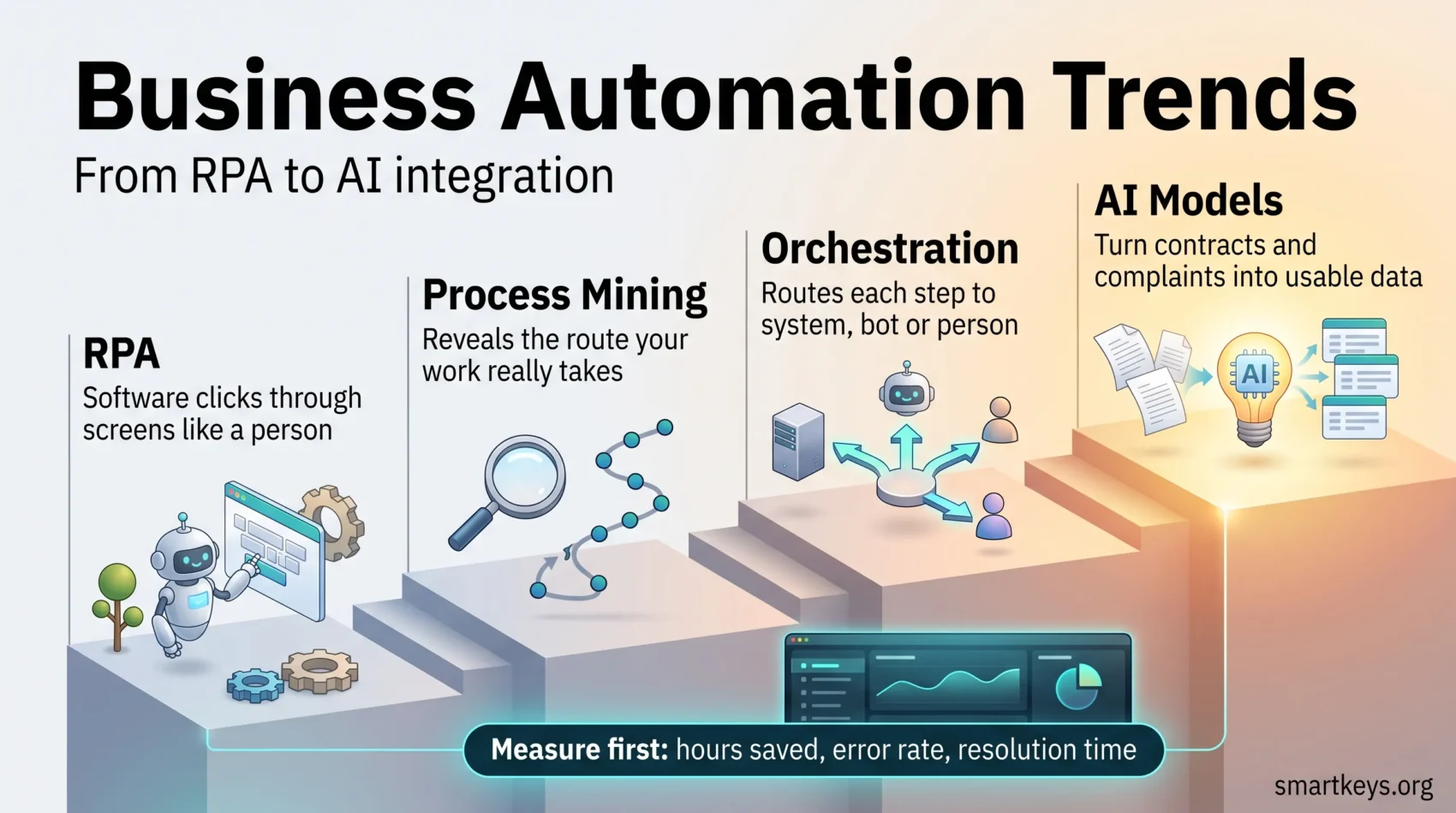
The Four Building Blocks, in Plain Terms
- RPA (robotic process automation): software that clicks through screens and moves data the way a person would. It is fast to build and breaks when the screen changes.
- Process mining: software that reads the timestamps in your systems and draws the route your work actually takes, including the detours nobody documented.
- Orchestration: the layer that decides which system, bot or person handles the next step, and keeps a record of it.
- AI models: the part that reads unstructured input, such as a scanned contract or a free-text complaint, and turns it into something the rest of the chain can act on.
Together they move you from automating a task to automating a journey. Our guide to implementing hyperautomation, from first pilot to full rollout covers the typical hurdles and how companies sequence the work.
Agentic AI: What It Promises and Where It Fails
An AI agent is software that is given a goal rather than a script. It works out its own steps, calls other systems, and reports back. A scripted bot follows a fixed path; an agent picks a path.
Gartner expects 33% of enterprise software applications to include agentic AI by 2028, up from less than 1% in 2024, and at least 15% of day-to-day work decisions to be made autonomously by then.
The same analysts are blunt about the near term. Gartner predicts more than 40% of agentic AI projects will be canceled by the end of 2027, citing escalating costs, unclear business value and inadequate risk controls. It also estimates that only around 130 of the thousands of vendors marketing agentic AI offer something genuinely agentic. The rest are relabelling chatbots and RPA, a practice Gartner calls agent washing.
The lesson is not to avoid agents. It is to be specific about what you are buying and to insist on a measurable before-and-after.
Why Process Mining Comes First
Most automation projects fail because the process being automated is a mess that nobody mapped. Process mining fixes that in the cheapest possible way: it reads the event logs your systems already keep and shows you where work waits, loops back, or gets reworked.
A typical finding is unglamorous and useful. An invoice approval meant to take two days takes nine, because a third of invoices go back to the supplier for a missing purchase order number. That tells you to build a validation check at intake, not a faster approval bot.
So map the process you actually run, not the one in the handbook, and record cycle time and error rate before the first bot goes live. Start with something that has clear boundaries and a lot of volume: order to cash, purchase to pay, or request to resolution.
Bring in the people who do the work early. They know the workarounds that never show up in a log, and a process they helped redesign is one they will actually use. Agree one clear goal per process with the department that owns it, then review the workflow on a fixed schedule. A process tuned last year drifts as tools, volumes and staff change.
Where Business Process Management Fits
Business process management, or BPM, is the discipline behind all of this. It is a structured way to analyze, model, run, monitor and improve how work moves through a company, and it existed long before the current wave of AI.
BPM software usually leans one of three ways. Integration-centric tools move data between systems with little human input. Human-centric tools route tasks, approvals and reminders between people. Document-centric tools follow a file, such as a contract, through review and signature.
The distinction tells you where to automate. If most of the delay sits in handoffs between people, a better approval flow helps more than a bot. If it sits in retyping data between applications, integration is the fix. BPM gives you the map and a named owner for each process; automation then speeds up the steps on that map.
Data, Integration and Edge Computing
Automation only works as well as the data feeding it. A bot that reads a stale customer record makes a fast wrong decision instead of a slow one.
Two shifts matter. The first is batch to streaming. Batch means data is processed on a schedule, often overnight; streaming means each event is processed as it arrives. If your automation is meant to catch a fraudulent transaction or a stockout, overnight is too late. Our overview of real-time data in business shows where the switch pays for itself.
The second is edge computing: running the processing on or near the device that produced the data instead of sending everything to a central cloud. On a factory floor or in a shop this cuts delay and keeps sensitive data local. See edge AI for business for the trade-offs.
Making Integration Boring Again
The unglamorous work is connecting systems. An integration platform as a service, usually shortened to iPaaS, is hosted middleware that keeps prebuilt connectors to common applications so your team does not write and maintain each one. Our guide to iPaaS and business integration explains where it fits, and our Workato versus Zapier comparison covers the practical difference between an enterprise platform and a lightweight one.
- Standardize: shared connectors and event-driven APIs survive vendor changes better than one-off scripts.
- Catalog your data: if nobody can say where a field comes from, no automation built on it is auditable.
- Monitor the models: accuracy drifts as your data changes. Check it on a schedule, not after a complaint.
Open-Source and Self-Hosted Platforms
Self-hosting means running the software on infrastructure you control rather than paying a vendor to run it. For automation, it changes three things: where your data sits, what you pay, and how far you can customize.
Running an open-weight model on your own hardware removes the per-call API fee, which matters once a workflow processes thousands of documents a day. It also keeps regulated data inside your own network, often the deciding argument in healthcare, finance and public sector work. Open-source workflow tools such as n8n and Apache Airflow have grown quickly in this space, because teams want an engine they can inspect, extend and move between clouds.
The trade-off is real. You take on patching, uptime, scaling and model updates. A small team without an operations function usually spends more in staff time than it saves in licence fees.
Automation on the Factory Floor
Manufacturing has the longest history with automation and the clearest measurements.
Machine Vision for Quality Control
A camera and a trained model inspect parts as they move and flag defects before they travel further down the line. The value is not that it spots more defects than a person, but that it applies the same standard on every shift and logs every decision.
Predictive Maintenance
Sensors track vibration, temperature and current draw. A model learns what normal looks like and flags a drift. The goal is to replace a bearing during a planned stop rather than a breakdown. Our guide to predictive maintenance covers where the savings are real.
Digital Twins and Flexible Lines
A digital twin is a live software model of a physical asset, fed by its sensors, that you can test changes against before touching the real thing. With modular lines and collaborative robots, it shortens changeovers when demand shifts. See digital twins in manufacturing for what these projects cost.
Security Automation
Security teams automate because alert volume outgrew headcount years ago. What gets automated is the repetitive middle of an incident. When an alert arrives, software gathers the context an analyst would have looked up by hand, checks it against known-good patterns, and either closes it or escalates it with the evidence attached. That leaves analysts on the cases that need judgment, and it produces a consistent audit trail for regulators and insurers.
Two architectural ideas dominate the discussion. Zero trust means no user or device is trusted by default and every request is verified, even from inside the network. Cybersecurity mesh distributes security controls close to each asset instead of relying on one perimeter. Our guides to zero trust and cybersecurity mesh cover both.
Automate the frequent cases first, such as phishing triage and password resets, before advanced threat hunting. Write the runbooks down so responses stay consistent, and review auto-closed alerts monthly to catch the ones the automation got wrong.
Low-Code and Document Processing
Low-code platforms let people build working applications by assembling components rather than writing most of the code. No-code goes further and removes the code entirely for simple cases. The appeal is speed: a department can build the small internal tool that IT would never have prioritized.
The risk is predictable. Applications built outside IT tend to have no owner once the builder leaves, no test coverage and no access review. Companies that get value from low-code pair it with guardrails: a register of what has been built, review before anything touches customer data, and a route to hand mature applications to IT. Our guide to low-code business process automation works through that governance.
Intelligent document processing, or IDP, turns paperwork into data. It combines optical character recognition with models that understand layout and language, so an invoice, contract or claim form becomes structured fields the rest of the chain can use. It is the most common entry point for automation in finance and insurance, because the input is high volume and the output is easy to check.
Good first targets are invoice capture, claims intake, identity checks and employee onboarding. Sample the extracted fields against the source documents for the first few months, and reuse the templates and connectors you build: the second project is far cheaper than the first.
What Changes Function by Function
Automation pays off fastest where volume is high and the rules are stable. Sequence by value and feasibility, not by which department asks loudest.
The same logic holds for a small business, just on a smaller scale. A single no-code workflow that stops someone retyping orders from the shop system into the accounting tool is often a better first project than any AI pilot.
Finance
Invoice capture, three-way matching and approval routing are the standard starting point. Measure days to close, the share of invoices needing a manual touch, and duplicate payments caught. Our guide to finance automation for accounting teams covers which processes to tackle first.
Marketing and Sales
Lead routing, data enrichment and follow-up sequences remove the administrative tail of selling. Our look at remote and hybrid sales teams covers which tools hold up in distributed teams.
Customer Service
Automated deflection handles the questions with one correct answer: order status, opening hours, password resets. It fails badly when it blocks access to a person on complex problems. See AI chatbots in customer service for what the evidence supports.
HR
Onboarding checklists, payroll and document collection automate cleanly. Hiring decisions do not, and they are increasingly regulated. Our guide to AI hiring tools covers the duties that now apply in New York City, Illinois, Colorado, California and the EU.
IT
Provisioning, access requests and routine patching are the classic wins. Measure tickets resolved without a human touch, and how often the automation has to be rolled back.
Rules You Now Have To Follow
Automation stopped being purely a technology decision in August 2026.
Since 2 August 2026, the transparency obligations in Article 50 of the EU AI Act apply. In plain terms: if your system talks to a person, you have to say it is AI unless that is already obvious. AI-generated or manipulated audio, images, video and text must carry machine-readable markings and a way to detect them. Anyone using emotion recognition or biometric categorization has to tell the people affected. Breaches can cost up to 15 million euros or 3% of global annual turnover.
There is limited relief. Content published before that date does not have to be labelled retroactively, and generative AI systems already on the market have until 2 December 2026 to meet the marking and detection requirements.
This reaches further than most companies expect. A support chatbot on a site used by EU customers is in scope, and so is an AI-written product description published without human editorial review. Our EU AI Act compliance guide works through the obligations, and our overview of AI regulation covers what is happening outside Europe.
Market Outlook and Honest ROI
The gap between adoption and proven return is the defining problem of 2026. Nearly every large company is running automation projects. Far fewer can put a number on what they returned.
The fix is unexciting. Decide what you are measuring before the project starts, record the baseline, and report the same numbers afterwards. Three measures cover most cases: hours returned to the team, error or rework rate, and time from request to resolution.
Two cautions belong in any business case. Freed hours only become money if they are redeployed to work that generates value. And cost estimates for AI-heavy automation are usually too low, because model usage fees, integration work and ongoing monitoring get underestimated. Cost overrun is one of the three reasons Gartner gives for the cancellations it expects.
Once the first projects prove themselves, the problem shifts from building to scaling without chaos. Our guide to setting up an automation center of excellence covers who should own that work.
For predictive use cases specifically, see predictive analytics for operations, and for a view of how outsourcing providers are absorbing this work, see our BPO trends guide.
Conclusion
The capability question is largely settled. The proof question is not.
Software can now read a contract, decide an exception and update three systems without asking anyone. Whether that is worth the cost depends on whether you picked a process worth automating and measured it honestly.
So pick two or three high-volume processes. Map what actually happens in them first. Record a baseline. Choose between hosted and self-hosted on your data and operations capacity, not on the demo. Keep a person in the loop wherever a wrong decision has legal or financial consequences. Then report the numbers, including the ones that disappoint.
For the wider strategic picture, see our guide to digital transformation and our analysis of how workers are adapting to automation.
Found this useful?
Make SmartKeys a preferred source on Google, and our articles will surface more often in your Top Stories, AI Overviews, and AI Mode.
Add as Preferred Source