

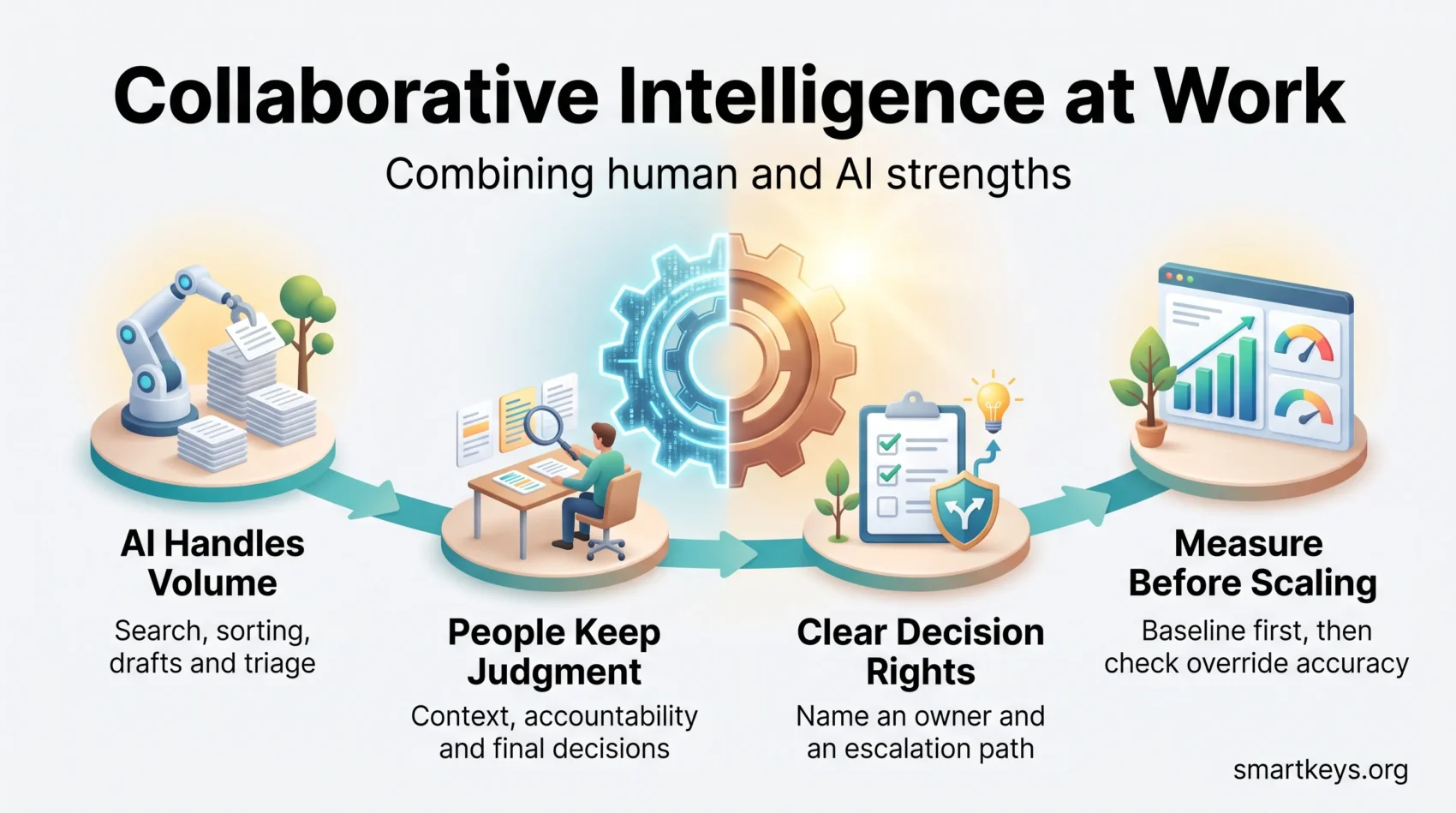
Collaborative intelligence means designing work so that people and software each do the part they are better at, instead of handing a whole job to one or the other. It answers a question most teams now face: you have AI tools, so which decisions do you keep, and which do you hand over?
Half of US employees used AI at work in the first quarter of 2026, according to Gallup, and 28% used it at least weekly. Adoption is no longer the hard part. Deciding who does what is.
This guide covers what the model is, what the research supports, and how to set it up without pretending the evidence says more than it does.
Key Takeaways
- Definition: A way of splitting tasks so people keep judgment and context while software handles volume, search, and pattern finding.
- The evidence is mixed: A 106-experiment meta-analysis found human-AI pairs beat humans alone, but often lose to AI alone on pure classification tasks.
- Where it works: Creative and generative work benefits most; narrow, repeatable prediction tasks usually do not need a person in the middle.
- What it takes: Written decision rights, a named human reviewer, and metrics you agreed on before the pilot started.
- What the law now requires: From 2 August 2026, EU employers face transparency duties when staff or customers interact with AI systems.
What collaborative intelligence means for you today
Start with the plain version. A task arrives. Software does the part that is high volume and rule-bound: searching, summarizing, sorting, drafting. A person does the part that needs context, accountability, or a judgment someone will have to defend later. That split is the whole idea. It differs from automation, which removes the person, and from a plain assistant, which only speeds up what you were already doing by hand.
A concrete example
Take a support queue. An AI system reads every incoming ticket, groups them by topic, drafts replies to the routine ones, and flags the twelve that mention a billing error. A support lead reviews those twelve, because a wrong answer there costs money and trust. Nobody reads 400 tickets to find them.
The measurable change is not “efficiency”. It is that the lead spends the morning on twelve hard cases instead of triage. That is the outcome worth writing down before you buy anything. Our guide to AI decision-making covers how to frame those choices.
Turning intent into something you can act on
Most teams stall here, because “use AI more” is not a plan. Four steps make it one.
- Name the outcome you want: fewer handoffs, faster first response, fewer errors caught late.
- List the tasks that stand in the way, and how many hours a week each one costs.
- Decide which of those tasks a system can do end to end, and which need a reviewer.
- Write down who signs off when the system is wrong. If nobody owns it, the pilot will quietly stop.
“When systems handle repetitive work, people have more space to solve the problems that actually need them.”
How we got here: from meetings to shared work with machines
The shift happened in stages, and knowing the stages helps you see which one your own company is in. Before the 2000s, coordination ran on meetings, memos, and people sitting near each other. Between roughly 2000 and 2010, that moved online. From 2010, search and rules-based automation began absorbing routine steps inside those tools. Since 2022, language models have made it normal for software to draft, summarize, and answer in the middle of a workflow rather than at the edge of it.
Why coordination and collaboration are not the same thing
This distinction saves a lot of wasted effort. Coordination is making sure work happens in the right order: who does what, by when. Collaboration is several people thinking about the same problem together. Coordination is cheap and easy to automate. Collaboration is expensive and should be rationed.
The classic research here is Rob Cross, Reb Rebele, and Adam Grant’s Collaborative Overload in Harvard Business Review. It reported that time spent in collaborative activities had grown by 50% or more over the preceding two decades, and that 3% to 5% of employees typically account for 20% to 35% of a company’s value-added collaborations.
That concentration is the risk: a handful of people become bottlenecks, then burn out. Automating the coordination layer is often the fastest way to relieve them. A meeting audit shows where to start, and our guide to asynchronous work covers moving status updates into writing.
“Use simple coordination for routine work. Save real collaboration for the problems that need several minds.”
What the evidence actually shows about pairing people with AI
This is where most articles overreach, so it is worth being precise. The best available synthesis is a 2024 meta-analysis in Nature Human Behaviour by Michelle Vaccaro, Abdullah Almaatouq, and Thomas Malone. It pooled 370 results from 106 experiments published between January 2020 and June 2023.
The headline finding is uncomfortable for the usual pitch. Human-AI combinations did beat humans working alone. But on average they did not beat the better of the two working alone. In other words, there was no general synergy effect.
Where the pairing helped, and where it did not
The task type mattered more than anything else.
On decision tasks with a clear right answer, such as classifying images, spotting deepfakes, forecasting demand, or reaching a diagnosis, the combined setup often performed worse than the AI system on its own. People overrode correct outputs.
On creative and generative tasks, such as summarizing discussions, answering open questions, and producing new text or images, the combination did better than either side alone.
The practical rule that falls out of this is simple. If the task has one correct answer and you can measure accuracy, test whether a person in the loop actually improves it. If the task produces something a person has to judge, shape, or stand behind, keep them in it. Our overview of AI augmentation versus replacement works through that mapping in more detail.
Be careful with productivity claims
Treat vendor figures on time saved as marketing until you replicate them. Slack reported in 2024 that users of its AI features self-reported saving about 97 minutes a week. That is a survey of the vendor’s own users, not a controlled measurement.
Independent research is more restrained. Gartner surveyed 724 respondents between June and August 2024 and found 37% of teams using traditional AI and 34% using generative AI reported high productivity gains, with marketing ahead and legal and HR behind. Gartner’s conclusion was that CFOs should reset expectations, because the gains look comparable to other technology rollouts rather than transformational.
The 2025 MIT NANDA report points the same way, finding the large majority of enterprise generative AI pilots produced no measurable return. That does not mean the approach fails. It means the projects that work have a narrow scope, a named owner, and a number agreed in advance. Our analysis of AI in business operations looks at what separates them.
A high-stakes example that does work
NASA’s Curiosity rover carries a system called AEGIS, which selects targets for the ChemCam laser instrument without waiting for instructions from Earth. Its deployment and the science team’s use of it were documented in Science Robotics in 2017.
The division of labour is the point. The rover picks targets autonomously between communication windows, because a round trip to Earth takes too long. Scientists set the criteria, review what came back, and decide what matters. Neither side does the other’s job.
Your framework: roles, decision rights, and feedback loops
A working setup needs three things written down. Not a strategy deck, three short documents.
1. Decision rights
For each task, record what the system may decide alone, what it may propose, and what a person must approve. Name the person, not the team. Add the escalation path: who gets called when the system is confidently wrong.
This matters legally as well as practically. From 2 August 2026, EU deployers of AI in employment settings must provide competent human oversight, tell people when AI is being used, and inform or consult workers about high-risk systems. Our EU AI Act compliance guide covers the current timeline, including the high-risk duties the Digital Omnibus deferred to December 2027 and August 2028.
2. The task shift
Write down which work moved to the system and what the people freed up are now expected to do instead. Skip this and the saved hours get absorbed invisibly, leaving you unable to show the pilot worked.
3. The feedback loop
Review weekly at first. Track where the system was wrong, where the reviewer overrode it correctly, and where the reviewer overrode it incorrectly. That third category is the one the meta-analysis warns about, and almost nobody measures it.
- Owners: one named person per task, with a documented escalation path.
- Boundaries: an explicit list of decisions the system may not make alone.
- Governance: data handling rules, an audit trail, and a way to explain any given output.
“Define the rights and the escalation paths up front, and trust follows. Leave them vague, and every exception becomes an argument.”
Implementation roadmap: how to start without a large programme
Start narrow. A pilot that covers one team and one task will teach you more in six weeks than a company-wide rollout teaches you in a year.
Find the friction
Ask each person to log, for one week, the tasks that take time but require no real judgment. You are looking for volume, repetition, and a clear definition of “correct”.
- Pick tasks where you already know what good output looks like.
- Set one measurable goal: hours saved, response time, or error rate.
- Avoid anything that touches pay, hiring, discipline, or health in the first pilot.
Pilot with a person in the loop
Run for a fixed period with success criteria written down beforehand. Keep a reviewer on every output at first, then relax that only where the accuracy data supports it. Compare against a baseline you measured before the tool arrived. Without a baseline, every result is an anecdote.
Build the skills the setup depends on
The skill that matters most is reading an output critically: knowing when a confident answer is probably wrong, and checking rather than accepting. Short role-based sessions work better than a general course. Our guides to building a data literacy program and measuring upskilling ROI cover how to run and justify that training. The EU AI Act has required AI literacy for staff working with these systems since February 2025, so for many employers this is now a duty.
Handle the resistance honestly
People resist these projects for a reason: they suspect the goal is headcount. Say plainly what the pilot is for, share the results including the failures, and publish the rules on monitoring. A generative AI usage policy is where those expectations belong in writing.
“Tell people what the pilot is measuring and what happens if it succeeds. Silence gets filled with worse guesses.”
Tools that support the split between people and systems
No tool creates this way of working. It can only make an agreed split easier to run. Judge any platform on whether it shows you what it did and lets a person intervene.
Communication and work management
Slack and Microsoft Teams bundle thread summaries, search over past conversations, and workflow automation for routine requests. The value is cutting the rereading, not replacing the conversation. Asana, ClickUp, and similar platforms surface at-risk work and draft status updates so dependencies stay visible without a standing meeting. That is coordination, which is the layer worth automating first. Our comparison of AI collaboration tools covers what each charges.
Analysis
Tools such as Tableau paired with an AI assistant let someone ask a question in plain language and get a chart back. The gain is access: people who would never have written a query can now look. The risk is confident answers built on a misunderstood data model, which is a governance problem rather than a tool problem. See our guide to data governance strategy.
Customer support and operations
Zendesk and comparable platforms detect intent and language, answer routine questions, and route the rest. Watch the deflection rate alongside the satisfaction score, because a bot that closes tickets without resolving them will flatter one and damage the other.
- Test for: an audit trail, an override path, and exportable data.
- Be wary of: per-seat AI add-ons priced before you know your usage.
- Remember: consolidating tools often beats adding another one.
Risks, ethics, and governance
Two organizations can run the same setup and get very different outcomes. The difference is usually governance, not technology.
Privacy and security
Map which systems touch personal data before you connect anything. GDPR applies in the EU; in the US, CCPA and a growing list of state privacy laws apply, and health information falls under HIPAA. The practical controls are the same either way: least-privilege access, encryption, retention limits, and logs showing who saw what. Our privacy compliance framework walks through mapping overlapping rules to one control set.
Bias and accountability
Bias does not announce itself. It shows up as a pattern in who gets flagged, rejected, or routed to the slow queue. Audit outputs by group, keep a decision log, and make sure someone can explain any individual result. This is most acute in recruitment, where the exposure is documented in our piece on AI hiring bias.
Monitoring and trust
Systems that assign, score, or track work change the relationship between manager and employee, and they are now regulated in several jurisdictions. If you are heading in that direction, read our coverage of algorithmic management and AI in employee monitoring first.
Integration and change management
Most failures are unglamorous: the system cannot reach the data it needs, or nobody owns the rollout after the pilot team disbands. Scope integrations narrowly and name an owner who is still there in six months.
“Good governance is what lets you scale something without discovering later that you cannot explain it.”
Measuring whether it worked
Pick a small number of measures and agree them before the pilot starts. Retrofitted metrics always show success.
Four that are worth tracking
Decision quality. Count reversals, escalations, and errors found downstream. This is the hardest to measure and the most informative.
Cycle time. How long a unit of work takes from start to finish. Easy to measure, easy to compare against your baseline.
Cost per unit. Total cost, including licences and review time, divided by output. Review time is the line most pilots forget.
Override accuracy. Of the times a person overrode the system, how often were they right? If they are usually wrong, the review step is adding cost and removing accuracy.
Collaboration health
Watch for load concentrating on a few people again, the pattern the Collaborative Overload research describes. Platform data on who sits in which thread will show it before anyone complains. Pair it with a short survey, because numbers will not tell you how the work feels. Our guide to continuous performance management covers building those check-ins into a normal rhythm.
“Choose three metrics, measure the baseline first, then decide what to scale.”
What is coming next
Three shifts are worth planning for, without betting the budget on any of them.
Conversation replaces menus. More software will be driven by describing what you want rather than clicking through settings, which is already normal in analytics and support tooling.
Agents that take multi-step actions. Systems that book, file, and update across several applications raise the stakes on decision rights. A wrong click is recoverable; a wrong sequence of twelve is harder to unwind. Our overview of AI-powered assistants at work covers where these are being deployed.
Regulation catching up. The EU AI Act timeline runs to 2028 and several US states have their own rules, so building an audit trail now is cheaper than retrofitting one later.
The advice underneath all of it has not changed: map the task, decide who owns the judgment, measure the result, and keep a person accountable for outcomes that affect other people. For broader context, see our coverage of how companies use AI in the workplace today, of hybrid jobs that combine human and AI skills, and our hybrid work policy template.
Conclusion
Collaborative intelligence is not a claim that people plus AI always beats either one alone. The research says otherwise, and pretending it does not is how pilots end up quietly cancelled.
What the evidence supports is narrower and more useful. On creative and generative work, the combination genuinely outperforms. On narrow prediction tasks, a person in the middle may add cost without adding accuracy. The job is to tell the two apart in your own workflows, one task at a time.
So start small. Pick one task, measure the baseline, write down who decides what, run it for six weeks, and look honestly at the numbers. That is the unglamorous part that separates the companies getting value from the ones still running pilots.
Found this useful?
Make SmartKeys a preferred source on Google, and our articles will surface more often in your Top Stories, AI Overviews, and AI Mode.
Add as Preferred Source




