

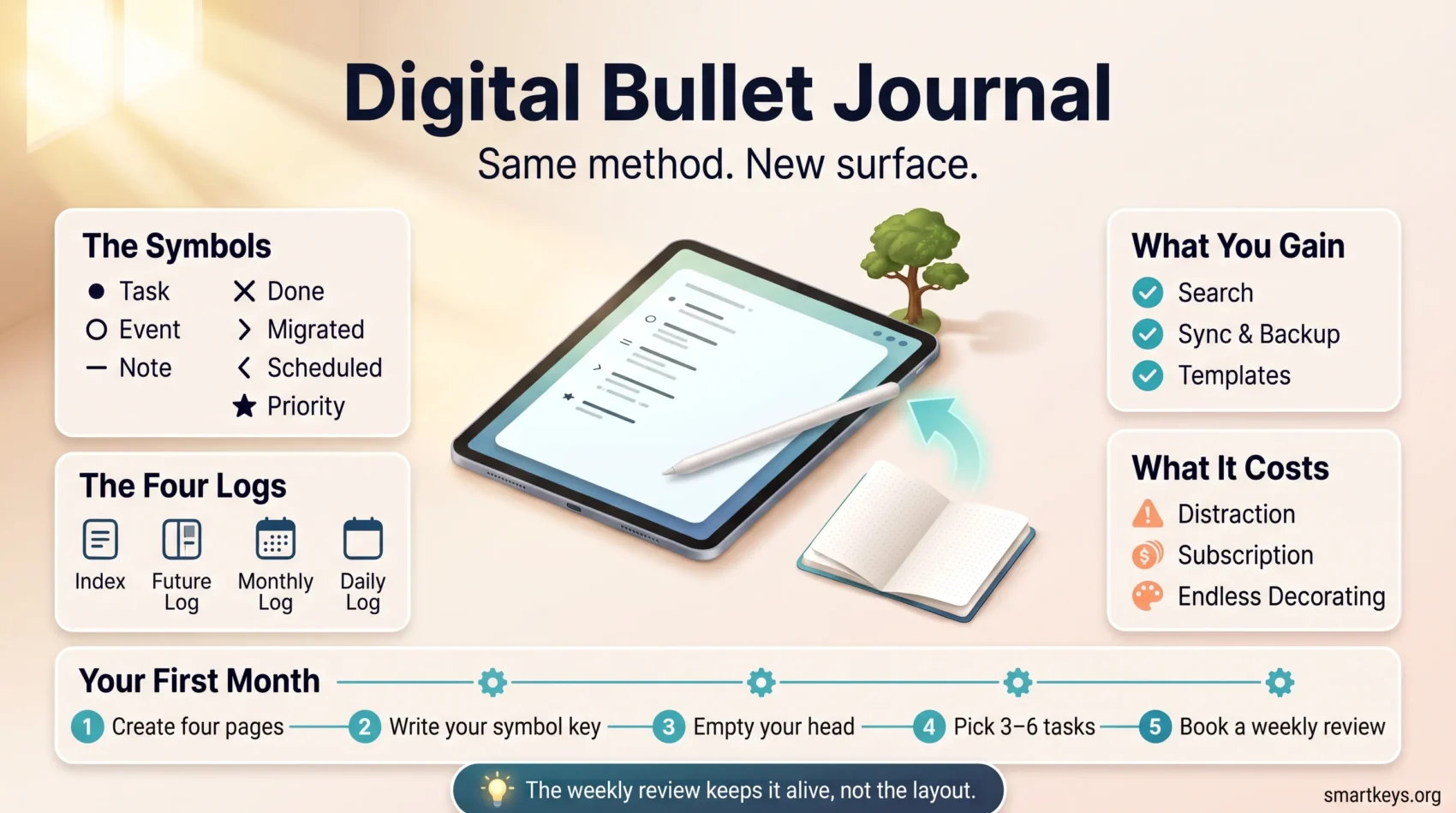
A bullet journal is a planning system, not a diary. Ryder Carroll built it so that tasks, events and notes live in one notebook, written as short lines with simple symbols instead of long entries. He launched bulletjournal.com on 18 August 2013 with a tutorial video and step by step instructions, and the method spread from there.
A Digital Bullet Journal keeps that structure and moves it into an app. You still write short entries, still review them at fixed points, still carry unfinished work forward by hand. What changes is the surface: a tablet and a stylus, or a typed note app synced across your laptop and phone.
That swap is worth making only if you know what it costs. This guide covers how the method works, what digital gains and takes away, which apps are worth paying for, and how to set up a first month you will still be using in two months.
Key Takeaways
- A Digital Bullet Journal is the Bullet Journal method (rapid logging, logs, migration) run inside an app rather than a paper notebook.
- Search, sync and templates are the real advantages. Distraction and a subscription are the real costs.
- Writing with a stylus keeps the handwriting motion; typing trades it for speed and searchable text.
- Goodnotes, Notability and Notion cover most setups, and each has a usable free tier for testing.
- The weekly review, not the layout, is what keeps the system alive.
Where the Bullet Journal Method Came From
Carroll, a digital product designer, built the system for himself before publishing it. The core idea is rapid logging: one short line per item, marked with a symbol, instead of sentences. A dot means a task, a circle means an event, a small dash means a note. An X over the dot means done. Two arrows handle what is left over: one pointing right for a task you have moved into the next month, one pointing left for a task you have pushed out into the future log. A star in the margin flags the few items that genuinely matter today. That is the entire vocabulary, and it takes about a minute to learn.
The method then arrived at exactly the moment when paper planning was becoming a visual hobby. A large community grew up around decorated spreads, hand-lettered headers and photographed pages, and for many people the artwork became the point. That is a fork in the road worth naming early, because it is the main reason people quit.
Tablets and pressure-sensitive styluses made a second version possible. You can now write by hand on a screen, or skip handwriting entirely and run the same structure as typed digital note-taking. Plenty of people end up hybrid: a paper notebook on the desk for thinking, an app for anything they will need to find again.
What a Digital Bullet Journal Actually Is
Strip away the decoration and the method is three moving parts. Understanding them matters more than picking an app, because every app just rearranges these.
The four logs
The index is a contents page you fill in as you go, so you can find a list weeks later. The future log holds things dated beyond this month: a conference in October, a renewal in January. The monthly log is the current month on one page, giving you the shape of the next four weeks. The daily log is today: tasks, events and notes as they happen, in the order they happen.
Collections
A collection is any page that groups related items outside the calendar. A reading list, a client’s open questions, a packing list, a running note on a project. Collections are where a bullet journal turns into a light second brain rather than only a planner.
Migration
At the end of each month you reread the open tasks and decide, one by one, whether to move each forward, schedule it, or cross it out. The friction is deliberate: rewriting a task you have ignored four times is uncomfortable, and that discomfort is the filter. It is also the step most people drop when they go digital, and the one that does the work.
Does Going Digital Cost You the Handwriting Benefit?
This is the question people actually mean when they ask whether digital “works”. There is some evidence to bring to it, though less than the confident headlines suggest.
In a study published in Frontiers in Psychology in January 2024, F. R. Van der Weel and Audrey L. H. Van der Meer recorded brain activity in 36 university students using a 256-channel EEG array while they wrote words by hand and typed the same words. Handwriting produced widespread theta and alpha connectivity across parietal and central regions; typing did not. The authors argue those patterns are associated with memory formation.
Two caveats matter. First, this was a lab task with single words, not a measure of how much anyone remembered from a planner. Second, and more usefully for this article, the handwriting condition was done with a digital pen directly on a touchscreen. In other words, the study compares handwriting to typing, not paper to screens. Writing your daily log with a stylus in Goodnotes sits on the handwriting side of that comparison. The authors themselves say the point is choosing the right method for the task, not abandoning digital tools.
The practical reading: if the physical act of writing is what makes the habit stick for you, buy a stylus. If what you need is to find a note from March in two seconds, type.
What You Gain by Going Digital
Search and reuse
This is the largest single gain. A paper journal is a stack of pages you leaf through; a digital one answers a question. Good stylus apps search handwriting too, so a scrawled client name from four months ago is findable. Templates mean you draw a monthly grid once rather than forty times.
Sync and backup
Your journal is on the tablet, the phone and the laptop, and it is backed up. If you have ever left a notebook in a taxi, this alone settles the argument. It also means capture works wherever you are, which is what stops a brain dump from happening on a receipt.
It joins the rest of your system
A digital journal can sit next to your calendar, your task manager and your files rather than beside them on the desk. If you already run a paperless workflow, keeping the planner on paper is the odd one out. Linking pages to each other, which paper cannot do at all, is where tools like Notion pull ahead.
What You Give Up
The device is also the distraction
Your journal now lives on the machine that delivers every notification you receive. Opening it to plan the day and closing it twenty minutes later having answered three messages is the standard failure mode. Turn on a focus mode before you open the app, or keep a dedicated device profile with almost nothing installed. A wider digital declutter helps more than any journaling tweak.
A recurring bill
A notebook is a one-off purchase. Most serious journaling apps are subscriptions with deliberately tight free tiers. The amounts are small, but they recur and they stack up alongside every other tool you pay for.
The aesthetic trap, now with infinite colours
Paper limits how much you can fiddle. Digital does not. Unlimited pens, stickers, fonts and templates make it easy to spend an hour styling a spread that holds four tasks. If you are decorating instead of planning, cut your palette to three colours and use them for meaning only, the way a working color coding system does.
Choosing an App
Prices below are the vendors’ published list prices in US dollars, checked in September 2026. Promotions and regional pricing vary.
If you want to handwrite: Goodnotes or Notability
Both are built for stylus input on a tablet, and both free tiers are large enough to test the method.
Goodnotes gives you three notebooks, three text documents, three whiteboards, 100 MB of storage and a 20-minute audio recording limit for free. Essential is $11.99 a year, Pro is $35.99 a year and adds cloud drive integration, real-time collaboration and the full AI features, and Teams is $120 per seat per year.
Notability starts you with five free notes, all editing tools, PDF import, its template library and seven days of version history. Plus costs $15.99 a year and lifts the note limit, adds audio transcription, handwriting search and 30-day version history.
For a first month either is fine. Pick the one whose pen feels better; that is a personal judgement you can make in ten minutes.
If you want to type: Notion
Notion is a different animal. It is a database dressed as a document, which makes it strong at collections and linked pages and weak at anything resembling handwriting. The Free plan covers one person, with 5 MB file uploads, seven days of page history and up to ten guests. Plus is listed at $10 per user per month and Business at $20, both discounted on annual billing, with the full Notion AI feature set sitting on Business.
If you want to spend nothing
The notes app already on your phone will run a bullet journal. So will a plain text file. The structure is what matters, and none of it requires a paid tool. If you are weighing the classic options against each other, our Evernote and OneNote comparison and the wider roundup of productivity apps cover the trade-offs.
Setting Up Your First Month
Keep the first setup deliberately plain. You can decorate in month three, once you know which pages you actually open.
- Create four pages: index, future log, this month, today. That is the whole system.
- Write your symbol key on the index page. Dot for task, circle for event, dash for note. Add nothing else yet.
- Empty your head into the monthly log. Everything you are carrying, in short lines. This is the one long session in the whole process.
- Fill today’s log with three to six tasks, not twenty. If you have never trimmed a list before, the guidance on manageable to-do lists applies directly here.
- Book the review. Fifteen minutes in your calendar, same slot every week. Without this the journal becomes a graveyard.
Anything that takes under two minutes should not enter the journal at all. Do it, using the two-minute rule, and move on.
Layouts Worth Building
Monthly and daily logs
The monthly log answers “what is the shape of this month”, the daily log answers “what am I doing now”. Keep the daily log short enough to fit one screen without scrolling. If it does not fit, you have written a wish list, not a plan. Sequencing the day is easier if you pair the log with time blocking or run the first block as a Pomodoro session.
Habit trackers
A grid of days down one side and habits across the top, ticked daily. It works because the record is visible, and it fails when you track nine habits at once. Two or three is the useful range. If you want to go further than a grid, a dedicated habit tracker handles streaks and reminders better than a journal page.
Goal and project pages
One page per goal, with the next concrete action at the top. Vague goals produce vague pages, so it is worth being strict about how you phrase them before you build the page. For sorting a crowded month, the Eisenhower Matrix is a quick filter: urgent and important first, important but not urgent scheduled, the rest dropped.
A reflection page
A few lines at the end of the day about what worked. This is where a planner starts doing what productivity journaling does, and it costs about ninety seconds.
Keeping It Going
Anchor it to something you already do
Pick a fixed moment: the first coffee, or the last ten minutes before you close the laptop. A planning habit attached to an existing routine survives; one that depends on remembering does not.
Protect the review
The weekly review is where you clear finished items, move what is still open and notice what you have been avoiding. A short monthly review does the same at a larger scale and is when migration happens. Skip these for three weeks and the journal quietly becomes an archive.
Expect to rebuild it
Your first structure will be wrong in ways you cannot predict. Delete pages you never open. A maturing system should shrink, not grow.
When Paper Is Still the Better Answer
Digital is not automatically the upgrade. Paper wins in meetings where a screen reads as rude or a laptop invites you to check something. It wins when the point of the exercise is to think slowly rather than capture quickly. And it wins on regulated or confidential material where you would rather not sync a client’s details to a consumer cloud service at all.
If you do land on paper, the kit is short. A dotted notebook rather than lined or squared, because dots give you a grid when you want one and stay out of the way when you do not. One fine-tipped pen you actually enjoy writing with. Sticky notes for anything you expect to move around. The A5 Leuchtturm1917 is the version most often recommended in the community, mainly because it ships with numbered pages and a blank index, which is what the method asks for anyway. None of that is required. Starting in a cheap notebook you already own is a perfectly good way to find out whether the method suits you before you spend anything.
The honest answer for most people is a split: paper for thinking, digital for anything that needs to be found, shared or carried.
Conclusion
A digital bullet journal is not a better notebook. It is the same method with different trade-offs: you gain search, sync and reuse, and take on distraction and a subscription in exchange.
What decides the outcome is not the app but whether you keep the review. Set up the four pages, write in short lines, and once a week move things forward by hand. That habit works in every tool on this page, which is why it is the part worth building.
Found this useful?
Make SmartKeys a preferred source on Google, and our articles will surface more often in your Top Stories, AI Overviews, and AI Mode.
Add as Preferred Source




