

Digital fatigue is no longer an edge case in knowledge work – it is close to the default condition. DataReportal’s Q1 2026 data puts average daily screen time for adults at roughly 6 hours and 51 minutes worldwide, with US adults closer to seven hours and the 18–24 group peaking above eight. On top of that, Microsoft’s Work Trend Index found that employees receive a ping – a meeting invite, an email, a chat message – about every two minutes during core hours: roughly 275 interruptions per day.
That is the environment your attention has to survive, and it explains why so many people end the day exhausted without being able to name a single demanding task they actually finished. The good news is that digital fatigue responds well to structure. This guide covers what it is, how to spot it early, and the tactics that reliably reduce it – a digital inventory, screen time limits, notification control, protected focus blocks, asynchronous communication, and detox routines you can maintain past week two.
Key Takeaways
- Digital fatigue is mental exhaustion from prolonged, fragmented screen use – not a lack of willpower.
- Physical signs such as eye strain, headaches and neck pain usually appear before the mental ones.
- Start with a digital inventory: you cannot fix screen habits you have never measured.
- Notification control and protected focus blocks deliver the fastest relief.
- Asynchronous communication attacks the cause, not the symptom, by removing the pressure to reply instantly.
- Tech-free activities and a consistent evening routine protect the recovery your brain needs.
What Digital Fatigue Really Is
Digital fatigue – also called technology burnout or screen fatigue – is the mental and physical exhaustion that builds up when your attention is split across screens, tools and notifications for hours at a time. It is not the same as being busy. You can finish a demanding day of deep work feeling tired but satisfied; digital fatigue leaves you drained and vaguely unproductive at the same time.
Definition and Core Symptoms
The clearest working definition: mental exhaustion caused by prolonged, fragmented screen exposure that erodes motivation, concentration and emotional resilience. Typical symptoms include tiredness that sleep does not fix, a flat sense of motivation, irritability, and physical discomfort in the eyes, neck and shoulders.
What makes it different from ordinary tiredness is the fragmentation. Your brain is not exhausted by the screen itself, but by the constant switching between contexts that the screen enables.
Why Screen Time Keeps Climbing
Screen time is not rising because people lack discipline. It rises because the structure of work pushes it up. The main drivers:
- Tool sprawl. Video calls, chat, email, project boards and documentation all compete for the same attention. Our guide to simplifying bloated toolsets covers how to audit and cut the stack.
- Hybrid and remote setups that route almost every interaction through a device.
- Information overload. More content arrives each day than any person can triage, which is exactly the problem a knowledge worker focus framework is designed to solve.
- Blurred boundaries. When the office is a browser tab, the workday has no natural end.
- Notification defaults. Almost every app ships with alerts switched on, and almost nobody changes them.
None of these are personal failings. They are design decisions – which means they can be redesigned. If the sheer volume of inputs is your main issue, our guide to managing digital overload pairs directly with the steps below.
Recognizing the Symptoms Early
Digital fatigue rarely announces itself. It accumulates, and most people only notice once performance has already dropped. Catching it early is far easier than recovering from a full burnout cycle.
Physical Symptoms
The body usually complains first. Watch for:
- Headaches, especially in the late afternoon
- Eye strain, dryness or increased light sensitivity
- Tension in the neck, shoulders and upper back
- General soreness or restlessness after long screen sessions
- Trouble falling asleep after evening screen use
These signs are easy to dismiss individually. Together, they are a reliable early warning. Poor workstation ergonomics amplifies every one of them.
Mental Symptoms
The cognitive signs follow shortly after:
- Cognitive overload – the feeling that everything is urgent and nothing is clear
- Irritability and a shorter fuse in meetings or chat threads
- Difficulty starting tasks, even simple ones
- A persistent sense of being behind, regardless of what you complete
- Reflexive device checking during any gap in the day
If several of these apply to you most days, treat it as a signal to change your setup rather than to push harder.
How Digital Fatigue Damages Focus and Output
The productivity cost is measurable, and it is larger than most people assume.
Fragmented Attention and Recovery Time
Research from Gloria Mark’s team at UC Irvine established that it takes roughly 23 minutes to fully regain focus after an interruption. Pair that with a ping every two minutes, and the arithmetic is unforgiving: most workdays never contain a single stretch of genuinely undivided attention.
ActivTrak’s 2026 workplace data reports an average focused session of just over 13 minutes, down noticeably from 2023. Attention is not collapsing on its own – it is being interrupted. Rebuilding it is a trainable skill, which our guide to extending your attention span works through in detail.
Cognitive Overload and Decision Fatigue
Every notification is a micro-decision: respond now, defer, ignore. Hundreds of those per day deplete the same mental resource you need for real judgement calls, which is why prioritisation feels hardest at 4 p.m. Our breakdown of decision fatigue at work explains the mechanism and the fixes.
The practical implication: protect your decision capacity the same way you protect your calendar. Structured intervals help – the Pomodoro Technique works precisely because it makes recovery non-negotiable instead of accidental.
Step One: Run a Digital Inventory
Before changing anything, measure it. Most people underestimate their screen time by a wide margin, and guesswork produces the wrong fixes.
Cataloguing Where Your Time Goes
Spend one ordinary week logging your usage, then sort it into categories:
- Focused work (writing, building, analysing)
- Coordination (email, chat, meetings, status updates)
- Passive consumption (feeds, streaming, news)
- Admin and everything else
The split is usually the revelation. Asana’s research puts coordination work at around 60% of a knowledge worker’s time – time spent talking about work rather than doing it. A structured time audit makes that visible in days rather than months.
Reading Your Screen Time Patterns
With a week of data, look for three things:
- Peak usage windows – especially late-evening sessions that cost you sleep.
- Emotionally draining activities – the apps you close feeling worse than when you opened them.
- Reflex checking – the pickups that serve no purpose at all.
That third category is where the easiest wins usually sit. Cutting reflex checking alone often returns an hour a day without touching anything you actually value.
Screen Time Management Tactics That Hold Up
Once you know your baseline, set limits that fit your real workload rather than an aspirational version of it.
Built-in Mobile Tools
Start with what you already own. iOS Screen Time and Android Digital Wellbeing both track app usage, set per-app limits, and schedule downtime. Focus modes on both platforms let you define which contacts and apps can reach you during work blocks – the single highest-leverage setting on most phones.
Daily Limits and the 20-20-20 Rule
Set clear caps for discretionary categories and leave work tools out of the calculation, otherwise the limits collapse within a week. Segment your day into blocks with defined screen and non-screen periods.
For eye strain specifically, the 20-20-20 rule remains the standard advice: every 20 minutes, look at something 20 feet away for 20 seconds. It costs nothing and measurably reduces end-of-day fatigue. Combine it with genuine short breaks away from the desk rather than a break that just switches from one screen to another.
Blockers and Focus Apps
When willpower is the only mechanism, it eventually fails. Tools that add friction work better:
- Freedom blocks selected sites and apps across all your devices simultaneously.
- Opal schedules focus sessions that lock distracting apps automatically.
- Forest turns resisting your phone into a small game with visible progress.
- RescueTime runs quietly in the background and reports where your hours actually went.
Our comparison of website blockers for focused work covers which setup suits which working style.
Digital Detox for Mental Clarity
A digital detox is a deliberate, time-boxed pause from devices. It is not about rejecting technology – it is about proving to yourself that the world does not collapse when you step away for a few hours.
What a Detox Actually Does
Even short breaks reliably lower stress, improve sleep and restore a sense of control over your own attention. Sleep is the clearest mechanism: a systematic review in BMC Medicine covering more than 30 studies found that each additional hour of nighttime screen use is associated with roughly 15 to 25 minutes of lost sleep. Since sleep quality drives next-day concentration, protecting your evenings may be the highest-return change in this entire guide – our deep dive on sleep optimization and productivity explains why.
Steps That Make a Detox Stick
- Establish screen-free zones: the bedroom and the dining table are the two that matter most.
- Schedule tech-free periods: start with a defined evening window rather than a full weekend.
- Start the day offline: do not check your phone in the first 30 minutes after waking.
- Set a device cutoff time and charge your phone outside the bedroom.
- Tell people: announced boundaries survive; silent ones do not.
- Track the change: note sleep quality and mood so you can see the payoff.
For a longer, structured plan, our digital detox routine and digital detox plan for improved focus lay out week-by-week versions. If social feeds are your main time sink, a targeted social media detox is the sharper instrument. A consistent evening routine is what turns any of it into a habit.
Focus Strategies That Reduce Fatigue
Reducing screen time is only half the work. The other half is making the screen time you do spend less fragmented.
Working in Protected Intervals
The Pomodoro Technique splits work into 25-minute intervals with short breaks, and a longer break after four cycles. The interval length matters less than the principle: a defined start, a defined end, and a break that is not optional. Variants like 50/10 suit longer analytical work better.
For anything cognitively demanding, pair intervals with a genuine deep work block and single-task through it. Monotasking is unglamorous and consistently outperforms the alternative. At team level, a no-meeting focus time policy protects those blocks far more effectively than individual discipline can.
Clearing Your Physical and Digital Space
Clutter competes for attention whether you consciously register it or not. Both spaces need attention:
- Clear the desk down to what the current task requires – see our guide to desk organization.
- Use noise-cancelling headphones or ambient sound to mask background noise.
- Close every browser tab that is not part of the task in front of you.
- File documents into a structure you can navigate without searching.
- Remove apps you no longer use – our digital declutter guide walks through the full sweep.
If you work from home, a properly separated home office setup does more for fatigue than any app.
Asynchronous Communication: Fixing the Cause
Most digital fatigue advice treats symptoms. Asynchronous communication addresses the cause: the expectation that you are available and responsive at all times.
The shift is straightforward in principle. Default to written updates that people read when it suits them, reserve live meetings for genuine discussion and decisions, and make response-time expectations explicit rather than implied. Teams that adopt this consistently report fewer meetings, longer focus blocks and noticeably lower stress – not because they communicate less, but because the communication stops arriving as interruptions.
Practical starting points:
- Replace status meetings with written updates in a shared document or channel.
- Agree explicit response windows – for example, chat within four hours, email within a day.
- Record demos and walkthroughs instead of scheduling calls across time zones.
- Add short breaks between back-to-back meetings so people can reset.
- Make cameras optional for routine calls; the fatigue difference is substantial.
Our guides to asynchronous work and asynchronous communication tools cover the tooling, while the meeting reduction playbook handles the calendar side.
Notification Control and Mindful Tech Use
If you change one thing after reading this article, change your notification settings.
Taming Notifications
With interruptions arriving roughly every two minutes during core hours, notification hygiene is not a minor optimisation – it is the main lever. A workable default:
- Turn off every notification that is not a person waiting on you directly.
- Batch email and chat into fixed check-in windows instead of monitoring continuously.
- Run a focus mode during your two most important blocks each day.
- Remove work chat from your personal phone, or at least mute it after hours.
Our guides to managing work notifications and setting instant messaging boundaries cover the settings in detail. Where local law or company policy supports it, the right to disconnect gives those boundaries formal backing.
Mindfulness in Everyday Tech Use
Mindful tech use simply means noticing what you are doing before you do it. A few habits that work:
- Check devices at set times rather than reacting to every alert.
- Pause for one breath before opening an app out of reflex – simple breathing techniques are enough.
- Keep screen-free zones in your home genuinely screen-free.
- Build a short daily meditation practice, which trains the exact attention muscle notifications erode.
Our guide to improving focus with mindfulness techniques goes deeper on the practice itself.
Protecting Your Mental Health
Recovery is not what happens after the work is done. It is part of doing the work sustainably.
Breaks and Downtime That Actually Restore
A break spent scrolling is not a break – it is a change of screen. Real recovery involves moving, changing your visual environment, or doing nothing in particular. Short movement breaks reset both body and attention, and structured downtime turns recovery into something you schedule rather than hope for.
Tech-free zones at home – the bedroom in particular – give your nervous system a reliable place to switch off. If workload rather than screens is the underlying pressure, our guide to managing stress for better productivity addresses that directly.
Tech-Free Activities
Reading a physical book, exercising, cooking, being outdoors: activities with no notification layer let attention recover in a way that passive consumption never does. They also rebuild the offline relationships that heavy screen use quietly crowds out. If you work remotely, the connection between isolation and fatigue is worth understanding – see our analysis of remote work and mental health.
Preventing Online Burnout
Digital fatigue left unaddressed becomes burnout, which is a far harder problem to reverse.
Recognizing the Warning Signs
- Chronic fatigue and consistently low energy
- Frequent headaches or muscle pain
- Changes in appetite or sleep patterns
- Feelings of helplessness and increased irritability
- Getting sick more often than usual
- Declining satisfaction and no sense of accomplishment
A brief weekly self-check catches these while they are still reversible. Our guide to managing employee burnout covers the organisational side.
Rebalancing Work and Leisure
- Schedule tech-free activities the same way you schedule meetings.
- Define clear work hours and hold them – our guide to setting boundaries helps here.
- Keep social commitments that have nothing to do with work.
- Build breaks into the day by default rather than as a reward.
Building a Team Culture That Reduces Fatigue
Individual tactics only go so far when the surrounding culture rewards instant replies. Digital fatigue is largely an organisational design problem.
Start by making it discussable. Teams that talk openly about screen load, meeting volume and notification pressure solve those problems faster than teams where everyone quietly assumes they are the only one struggling. Practical moves that work at team level:
- Review meeting load quarterly and cut anything that could be a written update.
- Agree shared no-meeting blocks so focus time is collective rather than negotiated.
- Set explicit norms for after-hours messages, including from leadership.
- Have managers model the behaviour – policies lose to example every time.
Some organisations formalise this with company-wide unplug days, which produce measurable focus gains when leadership genuinely participates.
Maintaining a Balanced Digital Life
The goal is not minimal screen time. It is intentional screen time.
Boundaries Worth Setting
- Tech-free zones at home, particularly the bedroom and dining table.
- Fixed windows for email and messages rather than continuous monitoring.
- A regular offline block – one evening or one morning a week is enough to start.
- A clear end to the workday, marked by an actual action such as closing the laptop and leaving the room.
Designing a Supportive Digital Environment
- Use screen time dashboards to review, not to punish yourself.
- Consolidate your tools – fewer apps means fewer notification sources.
- Keep one trusted system for tasks so your head is not the storage layer; our guide to effective task management covers the setup.
- Review the whole arrangement every few months, because your tools and workload will keep changing.
Conclusion
Digital fatigue is a structural problem, not a personal weakness. With screen time near seven hours a day and interruptions arriving every two minutes, exhaustion is the predictable outcome of the default setup – and the default setup is exactly what you can change.
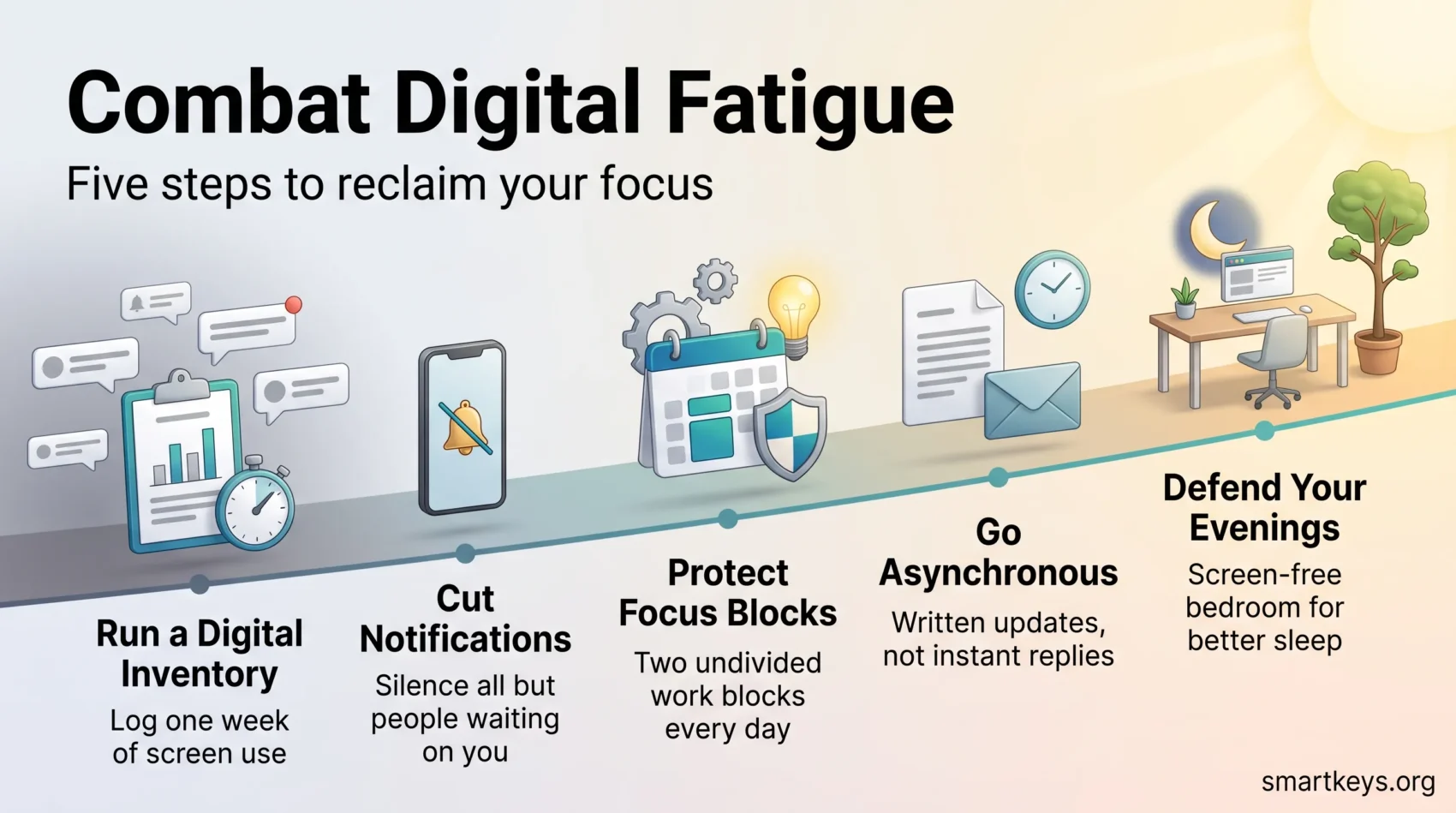
The sequence that works: measure your baseline with a digital inventory, cut notifications hard, protect two focus blocks a day, and defend your evenings so sleep can do its job. Add asynchronous communication if you have any influence over how your team works, because it removes the pressure that generates the fatigue in the first place.
None of it requires abandoning technology. It requires deciding when technology gets your attention instead of letting it decide for you. Start with the notification settings today – it is fifteen minutes of work and the effect is noticeable within a week.
Found this useful?
Make SmartKeys a preferred source on Google, and our articles will surface more often in your Top Stories, AI Overviews, and AI Mode.
Add as Preferred Source




